Thursday, October 31, 2019

How to Differentiate Your Ecommerce Website From Competitors in 3 Effective Ways


How to Differentiate your ecommerce website from competitors in a highly competitive digital market is easier said than done. There are definite reasons why certain ecommerce development teams charge more than their competitors. And today, we are going to be looking at those effective ways most digital marketers and product designers go about differentiating one product from its competitors.
No matter what type of online store or business you are running, there are going to be others going after your customers. Winning over new customers and upselling old ones has become more challenging, to say the least.
In this article we will look at the fundamental aspects of differentiating your online store or business from that of your competitors. This is not going to be about techniques and skills. I want to present this from my point of view as a consumer myself.
Let’s dive right in!

How Do I Differentiate certain ecommerce website from others?

#1. With how they offer their products or services in the way that they’d use it themselves.

Talk about how your customers will love your website so much is a really good way to differentiate your ecommerce website from your competitors. When your customers looks forward to seeing it each day. Your friends are gonna ask you what your secret is.
Let’s be honest. Most people don’t care about how much work you put into designing the ecommerce website. They want to know how your product or service will benefit them. So you have to paint a very clear picture of how much better their lives will be as a result of buying what you’re selling. Your ecommerce website must be able to add value to your customers’ lives.
Another thing you can do to present your product or services in a way you’d use it yourself is to make visitors feel more at home with you. When people doesn’t know you yet, they require a good deal of selling on your part to convince them that you deserve their business. Testimonials play an essential role in making prospects feel more at home with you. People are relational in nature. When they see others are using and feeling good about your product or services, they would be more open to paying for it.
How to Differentiate Your Ecommerce Website From Competitors in 3 Effective Ways

Wednesday, October 30, 2019

Strategies to mitigate the occurrence of product return issues

Start  a Simple After sales steps you can do right away:

  1. Send an acknowledgement – a simple thank you note acknowledging the sale and hoping for a continued association will do,
  2. Ask if they need any help with their purchase (if it is an appliance, they may need help in setting it up),
  3. Offer follow-up services in case of products that are a regular buy (like groceries),
  4. Ask for feedback and work on any pain points.
Strategies to mitigate the occurrence of product return issues

How to implement article and product data structure article schema?

How to implement article and product data structure article schema?

Tuesday, October 29, 2019

How to install a prestashop-thirtybees addon?

Installing a prestashop-thirtybees addon is a straight-forward process. This article is going to walk anyone through the installation procedure as simple and easy as possible. It does not matter if you are a seasoned web developer just starting to work on Prestashop-thirtybees ecommerce system, or someone who is migrating your ecommerce website from another platform, or a newbie trying to run an ecommerce website. This article is for you.
Before you get yourself wet, I believe it would serve you well if you get a really background what Prestashop is and  what is thirtybees ecommerce platform. Click the links to grasp an good idea around these beautiful ecommerce systems. You may also visit their individual websites. links below.
Source: Prestashop  Thirtybees
Alright, let's dive in!

How to install a prestashop-thirtybees addon?

We will assume that you have your module zip file ready somewhere in your local hard drive.
There are two ways to install a prestashop-thirtybees addon. The first and easiest one is through the back office of your prestashop-thirtybees ecommerce install. The easier one is by manual install through FTP or Cpanel upload. The more reliable way to install a prestashop-thirtybees module is using the later.
With that said, we will explore both routes in this article. Be reminded that installing through the back office might present some issues. The reason for this is sometimes your web server interferes with the upload and installation process when done through the back office of your prestashop-thirtybees system. Another issue is that, the zip file might have 2 level deep directory. And further, there might some memory issue during the upload process. I usually install addons throught FTP and Cpanel, it's safer although it takes a little bit of work, but not much.

Installing through the back office

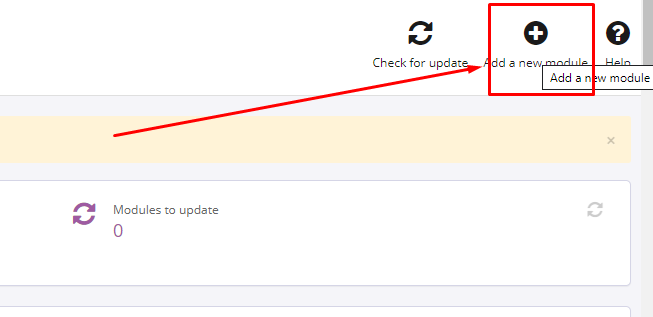
To install through the back office, login to your prestashop-thirtybees back office, go to Modules and Services. Find the Add a new module at the top of the page, and click to upload your module zip file, like so.
how to install prestashop addons
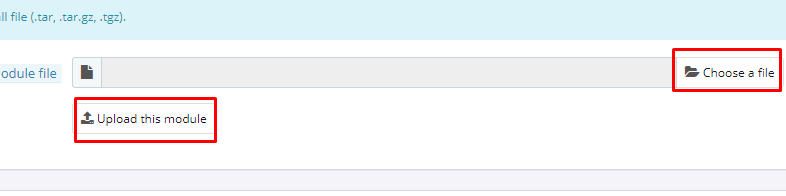
Choose your module zip file, then click the upload button.
install prestashop addon
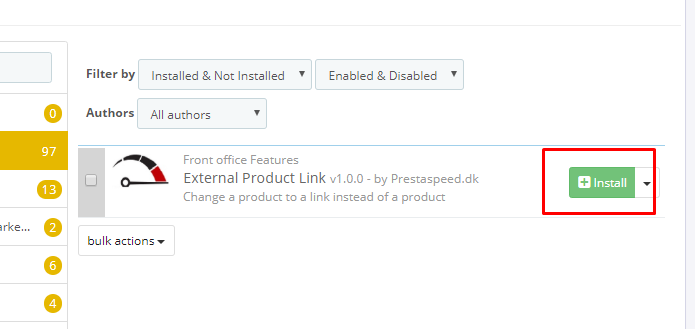
If your prestashop-thirtybees addon is properly uploaded, you should get a success notification at the top of the page. You should be able to see the newly uploaded module. Take a look at the screenshot of my install below.
install prestashop addons
Click the install button. And then configure module if needed.

Installing through FTP client or Cpanel upload

Uploading module files through FTP

  • Unzip (decompress) the module archive file
  • Using your FTP software
  • Place the folder in your PrestaShop-thirtybees /modules folder

Uploading module files through Cpanel

  • Login to you domain Cpanel
  • Navigate to File Manager
  • Open your PrestaShop-thirtybees /modules folder
  • Upload the zip file
  • After upload is done, right click on the module zip file and click Extract

Installing your prestashop-thirtybees module

  • Login to the BackOffice of your shop
  • Go to Back Office >> Modules.
  • Search for your module name in the list
  • In the row for the new module, click Install.
  • Locate the module again. If necessary, click >> Configure.
  • Once configuration is complete, be sure to test the module immediately to confirm that it functions as planned.
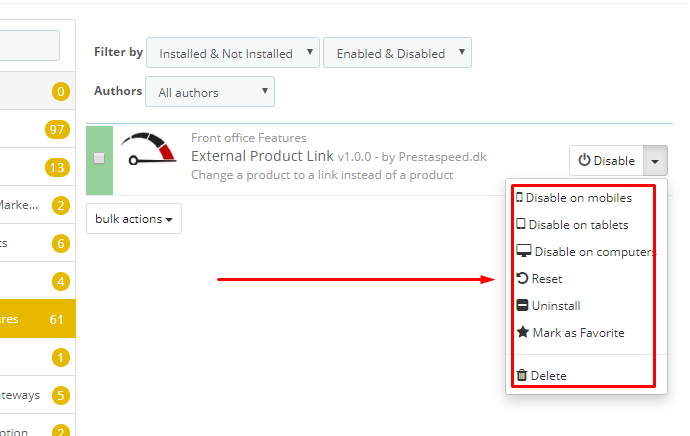
Your installed module should look like below.
install prestashop addon
Some modules does not require configuration. If your module requires configuration, the Configure button will show up in the drop down, like so.

Common installation issues with prestashop-thirtybees modules.

There are common installation issues with prestashop-thirtybees modules, and these issues usually relates to your server, file permission, server, memory limits, etc. Below are the most common ones.
  • Memory limit
  • " Your PHP sessions path is not writable - check with your hosting provider: C:\Windows\Temp\ "
  • " PHP parameters: PDO MySQL extension is not loaded "
If you error installation issue is about memory limit, simple increasing your server memory will do the trick. You may have to contact your web hosting service provider to do this.
If you encounter the last two error messages during the process of installing through the back office, contact your web host provider. The first one is an issue with windows server, and the last one is an issue of PHP extension. You may as well check if your PHP version is set to the latest PHP 7 version. Most of the times, upgrading PHP would solve those issues right away.
There you have it. That is the way to install a prestashop-thirtybees addon. Let us know your concern in the comment section below. And if I may make a request, please share to someone you know or share to your social media friends. Thanks and wish you success!

Monday, October 28, 2019

Leveraging social and digital marketing strategies for a successful holiday season

For many businesses, leveraging social and digital marketing strategies for a successful holiday season is a challenging and exciting period. For others, it can be like standing in the middle of an unending snow laden plain begging for the beach and the sunshine. Obviously, the holiday season represents an insanely busy time of year for most.
The National Retail Federation (NRF) reports the holiday season can represent as much as 30% of annual sales.
That is an insane figure! 30 percent!
Here is what the websites says about its recent consumer spending survey for 2019 holiday season:
October survey: Consumers plan to spend 4 percent more this year’s holidays. While Halloween 2019: Spending to reach $8.8 billion
The NRF also reports that consumers begin researching their holiday purchases earlier and earlier every year. More than half of consumers start researching in October or earlier with 33% of purchases starting in November.
With so much at stake, it’s imperative that small and medium sized business owners begin planning a marketing strategy to capitalize on the onslaught of holiday interest as soon as possible.

How do you leverage social and digital marketing strategies for a successful holiday season?

Make a plan and set up a smart goal for the holidays.

Having none is a sure way to lost your way around the business landscape. 90% of ecommerce businesses surely does not have a plan as far as social media and digital marketing is concerned. Don’t be counted for that kind of stats.  Having no plan and smart goal are top reasons why most of these small businesses fail in social and digital marketing.
When you make a plan, see to it that it is measurable. Put a time limit to it and make it clear when the goal is going to be completed and what are it’s milestones.
Having one will do wonders for your ecommerce website this holidays – even if it is not “smart” – better than not having a plan at all.
If you consider that most small businesses do not have a proper social media URL. Some of the URL are not easy to remember. The URL link is often too long and there is no proper brand positioning. Most small businesses merely are just “filling up space” by registering their names on social media. There is very little update from them on social media. Some companies do not even have a Facebook post yet even though their Facebook pages had been created years ago. This is ridiculous, you might think! But it is true, according to an article on linkedin.com.
Find great resource for your ecommerce website at shoptech media

Friday, October 25, 2019

4 Things To Figure Out When Starting an Ecommerce Website Business


Running an ecommerce website business seems like a cute idea for a lot of startups. But if you’re serious about starting an online business – or even if you already have one running – you have to figure out these 4 major things when planning to open an ecommerce website business.
Let's pretend for a moment that you have the best idea there is, an excellent product to sell, more than enough energy needed to go through the grind of running an ecommerce business. Yes, you read it right! Running an ecommerce website is a day to day grind. It is not different from a regular offline store. So, you need that energy to go through it day after day.
Alright, so, you did all your homework on that end, and now you were able to come up with your initial business road map(I will write a separate post about making a business plan for your ecommerce business). You poured out your best mind into writing it till your cupboard has no coffee left, and came out impressed! You start looking at the road map you have developed and came out asking,

Where do you go from here?

After coming up with your initial plan it is now time to do some research about your business plan. Get deeper knowledge into running the business. You need also, maybe, check out on some people's testimonials on how they did it. That is to save you heartaches later on. But the purpose of this is to give you an idea how to figure out 4 major things about running an online store. Let's take a look at these 4 one by one.

#1. Figure out the right software for your online store business.

What is the right ecommerce software for my kind of business? There are a ton of ecommerce softwares out there. Some are really good, but there are others that are really bad. Two things you should try to be certain of about your choice is, does it work?  You don't want to become frustrated later with issues that the developers themselves cannot resolve. The other to be certain about the ecommerce software is,  is it FREE?
This is crucial in your choice because, in the first place, when you just started a business, you want to scale down on your cost. So, being free is HUGE! And it has to work, that is no question. The next question for you is which one?

Which FREE ecommerce software?

I usually give out two questions when choosing between two GNU softwares, after making sure that they work. That is, what is the server requirements? Does the software comes heavy on the server? Knowing this will determine where you will want your ecommerce website be hosted! Because you do have to consider the hosting side for your ecommerce business. Do you want to host it yourself, or have your store as a sub-store of a big store system. The other question is, is the system fast and efficient?
There are other things you would want to know about choosing which ecommerce software to use is support and cost of development. Big systems or systems with a lot of users does not necessarily mean, the best choice. Marketing has a lot to do with it. My suggestion is to find out the reasons not to use the software. By doing that, it kind of clears away all the marketing aside.
As ecommerce developers with a cumulative years experience of almost two decades, we have seen a lot of  ecommerce softwares come and go. While meaningful customers become frustrated and broken. We don't want that for you. My suggestion is to go for a light and fast system, and it must be maintainable and scalable yet efficient system like thirtybees ecommerce. Know more about what is thirtybees ecommerce software in this post.

#2. Figure out where your customers are.

I am going to say this straight, figuring out where you customers is different from actually getting them to come and visit your store. But by doing so, you have already given them the first step in their buying decision. But to have them actually come and buy is another topic worth writing. Which I could say, would be your biggest challenge once your online store is up! We call that SEO!
Figuring out where your customers are hanging out, and what are they looking for entails a lot of research and testing, and marketing. It will require your time and people skills. But believe me, once you are able to do this, you are giving your ecommerce business a future. SEO work is giving your business  a future in the digital world market! Without it, you can basically kiss your ecommerce business dream goodbye!

Read full post where should I start with my ecommerce business website?
Find great ecommerce resource at shoptech media

Wednesday, October 23, 2019

How to Build Prestashop-thirtybees sitemap properly for Google Search

To Build Prestashop-thirtybees sitemap is a integral part of web development, especially if your website is an ecommerce one. In order for your online store to be visible to Google and other search engines, you must provide the search engines bots a map of all the links in your store.
Sitemaps are your instruction manual for search engine robots, on how you want them to crawl and read your contents. If your instructions are not clear, search engines are not going to be able to read your contents properly. For example, if you have a link to a content in your sitemap, that content must exist. If that content is no longer published, the search engine robot will keep on looking for it, then return a report saying, they couldn't found your link. In time, it will give your website a negative reputation for bad links.

Build your Prestashop-thirtybees Sitemap as an instruction for search engines robots.

Google search engine and all the major search engines are quite capable of automatically finding the links that make up your shop through the robots. But crawling is not so simple. You have to tell it how you want your site to be crawled and how to find each content. This would also include the publish date and date of modification. It is therefore necessary to use Prestashop-thirtybees sitemap properly to maximize this versatile SEO tool. Google is so smart it can quickly update its index as soon as you changes are made in your store's content. But again, you have to give out the instruction.

3 Major mistakes to avoid when you build your prestashop-thirtybees sitemap

As mentioned above, sitemaps are your instructions for search engine robots on how to you want your website to be crawled and reported for search result. it is an underappreciated tool for SEO, because there are a lot of site owners who takes sitemaps for granted during development. Only taking care of it when they start asking why their contents are not showing up in google search. So, avoided the following mistakes when putting a sitemap in place for your ecommerce website.
  • The first mistake is NOT SETTING up a scheduled task for new contents to be generated, so the sitemap does not refresh properly.
  • The second is NEVER checking if the sitemap is working properly, ie to check that the ".xml" files are modified on the FTP.
  • Finally the third is FORGETTING to submit the sitemap through the Google Search console, to ensure there are no errors reported (after a few days).

Let's dive in straight to this tutorial

Find great content on ecommerce at shoptech media