Friday, November 22, 2019

Increase Visibility with Prestashop-thirtybees CMS Module

The Prestashop-thirtybees CMS module pages is one of the main feature that is often underused. Easily build content to increase your visibility in addition to your product pages with cms module. This post is meant to allow anyone to optimize the presentation of this native functionality of your prestashop-thritybees store!

The Prestashop-thirtybees CMS module for pages

This module allows you to create a real living "bible" of content on your ecommerce store, but for that you need to correctly configure the CMS blocks module and arrange your content intelligently. It is important to centralize the CMS blocks to give a real sense of entity and not to let these module blocks hang around anywhere on your shop.
When creating contents with CMS module, consider using external tools such as layoutit, to generate fully responsive content, especially if without having any programming skills or limited knowledge in programming. Although prestashop-thirtybees ecommerce comes with the native TinyMCE editor, it is not optimized for the creation of multi-media content. But if that is not an option for you, TinyMCE would be fine.

The Usefulness of CMS block module pages?

Prestashop-thirtybees CMS block module is a very handy tool for making presentation pages for your ecommerce website. It can also be used to create posts for your store blog(thirtybees comes with a native blog to be used for blogging contents which will allow you more control of your contents outside of the products).
Another use for the CMS block module is for your website's FAQ pages. It really comes in handy. And of course, publishing new information for your users to consume.

Let's get into it!

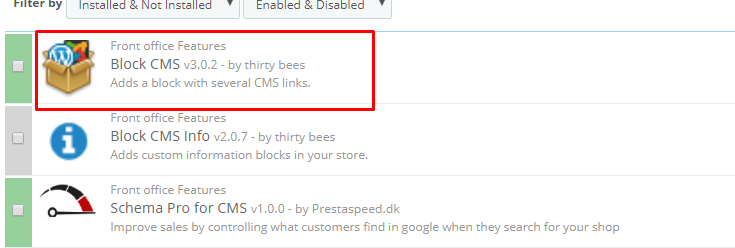
As usual, you need to go login to your back office dashboard. Surf down to Modules and Services, and search the modules by typing the word "cms". The system will give you three options like the screenshot below, like so.
cms module
Click the Configure button and check the contents that is in there. At this point, you don't need to change anything. What we are after is for you to familiarize with how this CMS module is set up. Click save.

Enabling the CMS block module in your theme

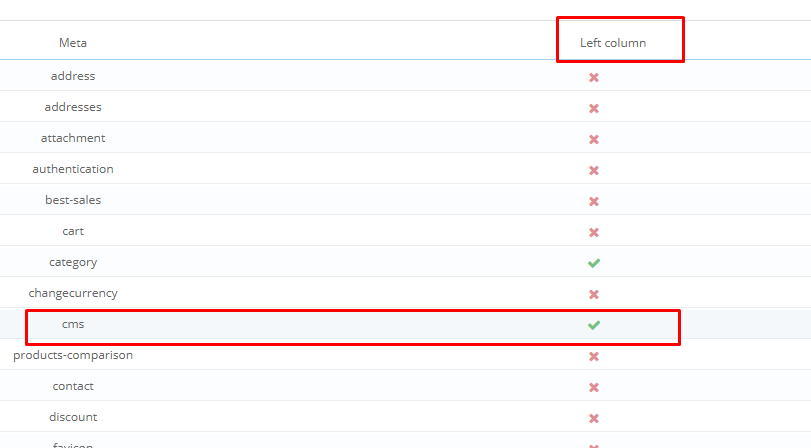
You need to enable the CMS module block to make it appear in the front office. To do that, go to Preferences, then Themes. You will see the theme you are using at the top of the page, look for Advance Settings, then click it. What we are going to do here is to check if our CMS module is enabled to display in the left column of your shop. If it is not, click the "x" button to enable it, like so. Then click Save, like so.
cms block module

Checking if Left Column displays in CMS pages.

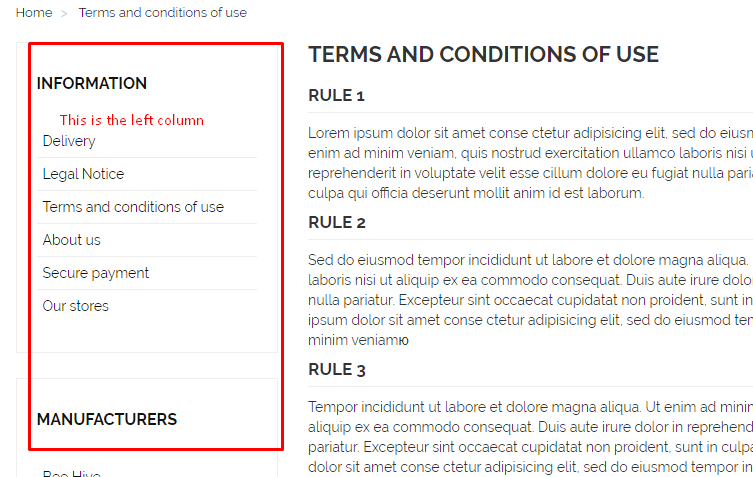
Now that your CMS module is enabled, you should be able to see it in your website. To see, it, click on any information page like "About us" or "terms and condition" page. You should see your left column enabled. There will be a bunch of other modules that you will see together with the CMS module block. Some of it are necessary, but others you may have to remove. Let's remove the ones that are on top of the left column, this should be the categories block and Best Seller block.
cms block module

Removing unnecessary blocks on the left column

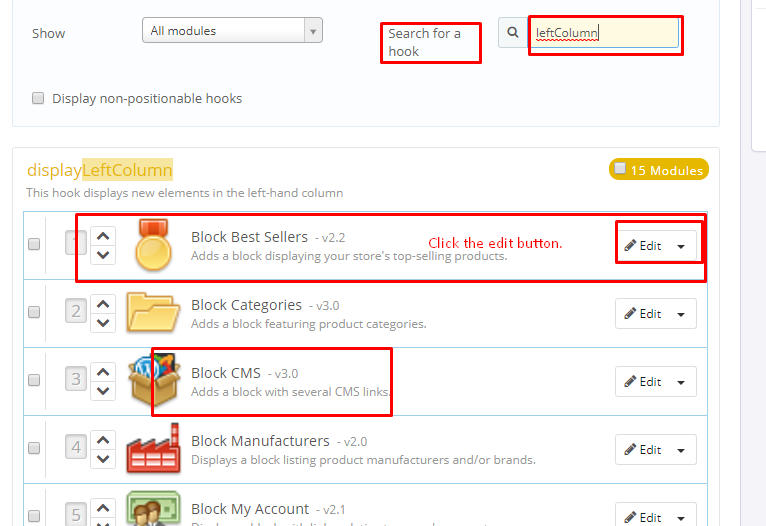
It is so simple to do this. All you need to do is go to Modules and Services, then click on Positions. Once inside, go to the upper left side of the page and look for the line "Search for a hook". Type in the word leftColumn,  it should give you the contents just like the image below.
cms block module
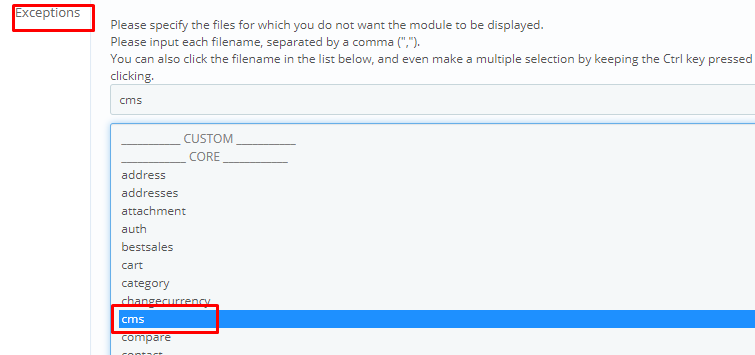
To un-display the Best Sellers block and the Categories block, click on the Edit button. Look for the Exceptions table that says:
Exceptions
Please specify the files for which you do not want the module to be displayed.
Please input each filename, separated by a comma (",").
You can also click the filename in the list below, and even make a multiple selection by keeping the Ctrl key pressed while clicking, or choose a whole range of filename by keeping the Shift key pressed while clicking.
cms block
scroll down and click on the CMS, then click Save. Doing this means that, this particular block will not be displayed on the CMS module contents or pages.
If you go to your front office again and click on the page you were in before, then hit refresh, you should not be able to see the Best Seller block. Do the same with the Categories block, or un-display/display blocks as much as you like. The purpose of this exercise is to get familiarize how blocks are being displayed in your prestashop-thirtybees ecommerce system.

Creating your first CMS page

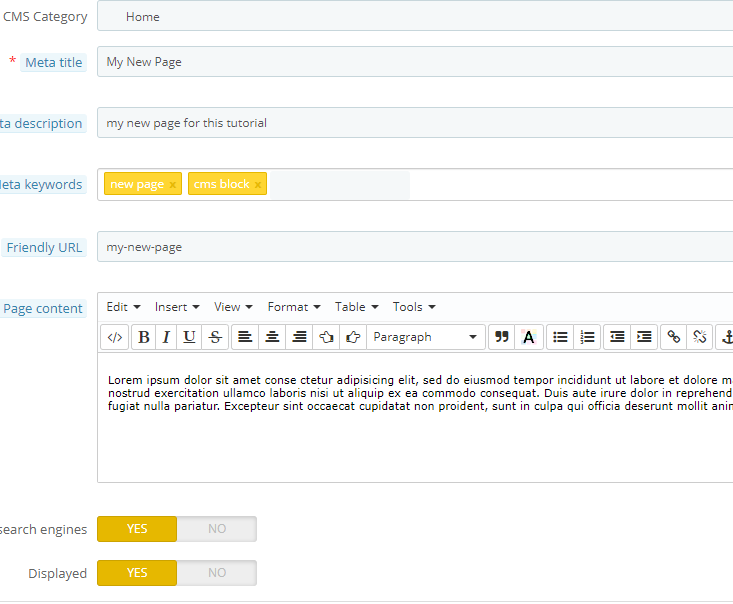
Alright! You are basically done with learning the CMS block module. You were able to activate the left column to display the CMS pages, then we hide the blocks that were not necessary. Now all you need to do is create a new CMS page. To do this, go to Preferences then CMS, like so.
cms block module
Don't forget to click the Save button at the bottom right of the page.

Displaying your new content page in the CMS module block and footer block

The page link to your new content will not be displayed yet in the CMS block. You have to do one more step to be able to make it display as you wish it. To do this, you have to go back to the Modules and Services, then search for the CMS module, click configure.
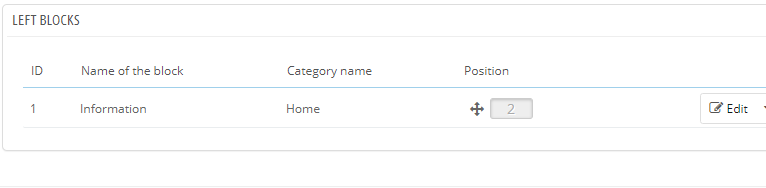
Once at the configuration page scroll down a little till you see this,
cms block module
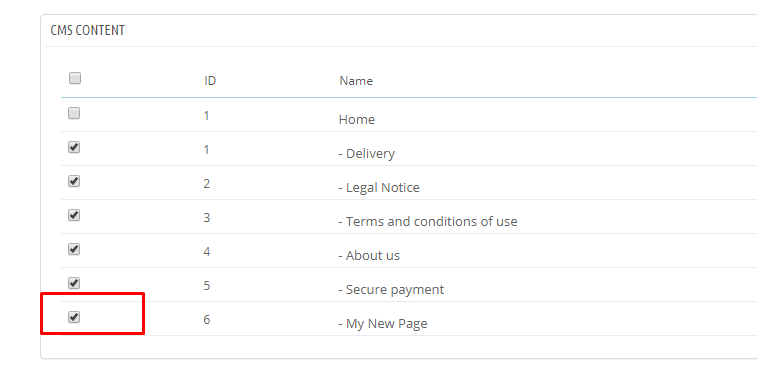
Click the Edit button, then look for the title of your new page(mine is "My New Page"), then check the check box to display it along with the information pages your have. Click Save.
cms block module
If you want your new page to display at the footer, you will have to enable it too. Look for the sentence,
"Display various links and information in the footer"
Look for the title of your new page, then check the check box to display it along with the information pages your have. Click Save.
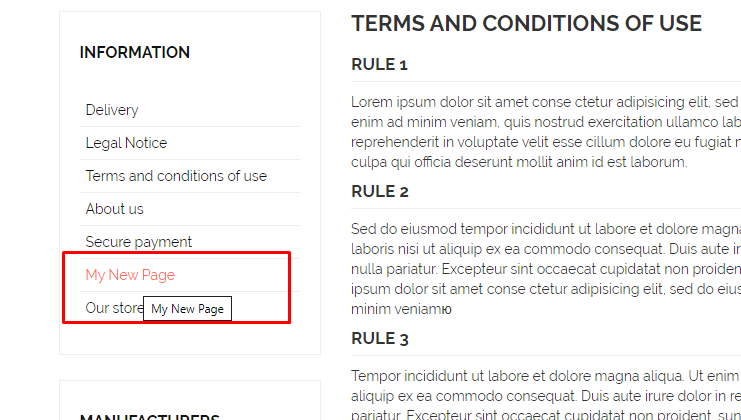
Now your new CMS page should be visible in the CMS block module and the footer of your store, like so.
cms module
Alright!! So far so good! We are basically DONE!

In conclusion

Setting up and configuring the prestashop-thirtybees CMS module block  is quite tricky for the untrained eye. But once you get familiar with it, it is actually easy.
Find great ecommerce resource to gain more sales out of your ecommerce website
Double your sales with Customer Loyalty programs
Reward your loyal customers with referral programs

Wednesday, November 20, 2019

Reward Your Customers with thirtybees Ecommerce Referral Program

When running an ecommerce referral program, remember these three very important points:

#1. Give people a self-serving reason to WANT to talk about your product and refer you. If what you offer is uninteresting, people wont refer it. So, make a compelling reason for them to refer.
#2. Make it really easy for your customers to refer you and they’d be happy to do it!
#3. Get influential people to endorse you. There are “influencers” who can bring you new buyers (because they are looking for ways to save money). I see a lot of shops and yet, I seldom see them highlighting affiliate program. While it is not complicated to use, only a few really explains how this work to customers. In fact, if you do this, go extra further and make a video that explains your approach, why you put this program in place and why everyone is a winner (to reassure them too).
Reward Your Customers with thirtybees Ecommerce Referral Program

Tuesday, November 19, 2019

Page Load Speed! How fast is fast enough for your ecommerce SEO?

Page load speed is one of the top priority for ecommerce owners. it should be. Improvements on this area must be high on your ecommerce website to-do lists. In fact, it should have been there at the onset of development. Not counting better user experience.

Is Improve page load speed a worthwhile priority?

Absolutely! Page load speed raises your shops potential for increased revenue as well as better organic search rankings. You may ask, how? The answer lies in what searchers does after clicking your link. Let us do some SEO math:
Slow website = Higher bounce rate. Higher bounce rate is translated as a bad user experience by Google.
Bad user experience = Lower Google ranking. That is how website page load speed matters to your ecommerce SEO

What is a Bounce rate?

To understand better, check this definition from one of the top seo guys in the industry. Google support itself.
A bounce is a single-page session on your site. In Analytics, a bounce is calculated specifically as a session that triggers only a single request to the Analytics server, such as when a user opens a single page on your site and then exits without triggering any other requests to the Analytics server during that session.
Bounce rate is single-page sessions divided by all sessions, or the percentage of all sessions on your site in which users viewed only a single page and triggered only a single request to the Analytics server.
Google loves websites that are faster because they can provide better experience for searchers, and also are more likely to drive revenue. Thus, Google asserts, you should make your site faster regardless of whether it helps your organic rankings directly or not.

What does it mean to say that your goal is faster page speed?

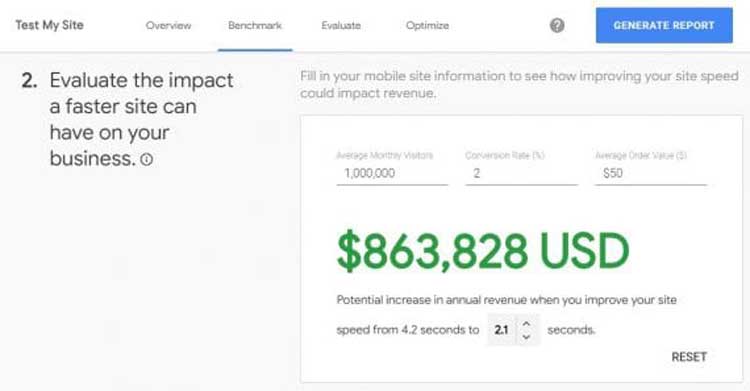
To help us understand this, Google came up with a revenue calculator, shown below. This app estimates the value of optimizing your site’s speed based on your analytics data. All you got to do is plug in your traffic, conversion rate, and average order value, and Google spits out a revenue projection.
page load speed
So, in simple terms, faster page load speed equates to more revenue, according to google. And it makes sense for a  couple of reasons: Better user experience which leads to happy customers, and better search engine ranking for the website.
So, a reduction of website page load speed from 4.2 seconds to 2.1 seconds with 1M monthly visitors and a 50$ average order will result to a million more $$$ in revenue. This is what it means to state a goal of a better page load speed.

The science of fast page load speed for ecommerce system.

Of all the website systems in the world, ecommerce systems and platforms are the ones that have to be up there in speed. But there are barriers to discussing page speed between marketing and development teams because of the lack of communication standard. It can not be overstate enough that both sides need to understand the metrics beyond “just make it faster.”
A couple of points regarding this communication standard need to be set: One is the "First page paint" and the other is the "Full Page paint". Therefore, development teams should make it a point not to preload javascript files and third-party script files. Async-await can be use for this, or simply place the call at the footer after the initial page is loaded.
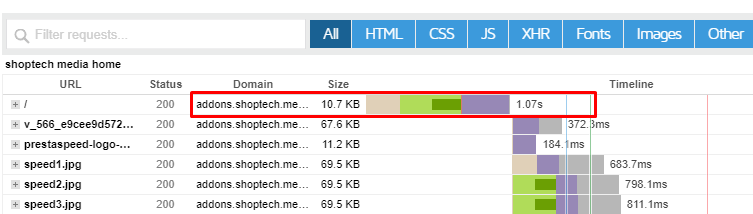
First page paint is the initial loading of your page without the javascript and third-party scripts. It is the time between navigation and when the browser render the first pixels of your website to the screen.
At normal development, without further SEO work, our ecommerce development process using thirtybees platform generates a 1.07s. The average accepted page load speed to be called a good website is 3.5sec. Within 3.5 seconds, your visitors should at least be able to see the website navigation. And see the fully loaded ecommerce website within 8.5 seconds.
page load speed
You may notice that, even without further optimization, our ecommerce system is more than 2 seconds faster than a standard ecommerce website.
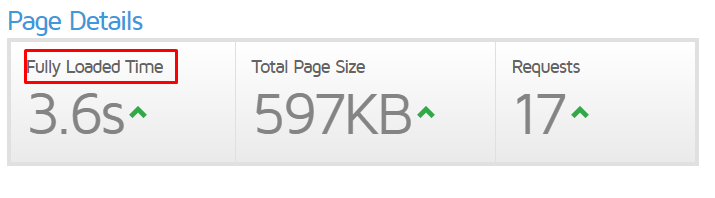
This is the page load speed performance of our ecommerce system after fully loaded without speed optimization.
page load speed
Our deliverable is usually below 1 second of page load speed! Take for example this one ecommerce website developed in thirtybees system which is way below 1 sec with speed optimization.
page load speed
Because we understand that website speed is crucial for every ecommerce website we develop!
We can never stress page speed enough. We are proud of our ecommerce system because we build each with speed and your revenue in mind!

Now  a couple of things for the technically-minded. Google does offer two toolsets to help you out with page load speed.

PageSpeed Insights is the more user-friendly of the two. It shows a handy one-size-fits-all PageSpeed Score from 1 to 100 — which sadly does not correlate to whether you’re receiving the page speed rankings boost — alongside some detailed recommendations for how to improve.
Lighthouse crosses into developer mode with waterfall data for debugging. But it still offers the simple scoring and easier-to-understand recommendations of PageSpeed Insights.

In conclusion:

So, how fast is fast page load speed? A standard ecommerce page load speed should aim for a "First paint" of 3 seconds. This should give your users plenty of time to check out your website rather than spend them waiting for loading time. And at 8 seconds, your webpage should be fully loaded. However, to get past your competition, it is not enough just to be average and normal. Aim for the speed of 1 second, that would really give your website a boost in search engine ranking and increase your revenue as well.
Need help with developing a fast ecommerce website? Check us out using the contact form.
Don't forget to tell us about what you think in the comment section. And if I may, please share this content to your social media friends. thanks and be blessed!

Monday, November 18, 2019

13 easy ecommerce SEO tips to generate more traffic to your shop

There are a number of ecommerce seo tips your can implement to optimize your website to generate more traffic—such as by including calls to action and lead capture forms in the right places, providing the information your visitors are seeking, and making navigation easy and intuitive. Your goal when it comes to generating more website traffic is to be driving more qualified visitors to your site. That is, those who are most likely to convert into leads and customers.
These Ecommerce SEO tips are designed to generate traffic to your website to improve your rank which in turn juices more traffic from search engines, social media sites, etc. Although what you want to make sure is that the increase in traffic be associated with an increase in engagement as well. If your traffic is increasing but your conversion rates are decreasing, you’re not bringing in the right traffic. Everything is going to start with generating more and more traffic first.

I have gathered 13 ecommerce SEO tips for you to  easily implement to generate more traffic to your shop

Tip #1. Every ecommerce website should have a sitemap. Install/enable your sitemap and set it to regularly generate and update your content links.

Tip #2. Implement Schema and structured data

Tip #3. Focus on improving your anchor link text

Tip #4. Make sure your pages are responsive and displays well in both desktop and small devices.

Mobile responsiveness is one of the most important elements of a ecommerce seo to make your website search engine friendly.

Tip #5. Another easy ecommerce SEO tip is to always optimize your images with alt tags.


Tip #6. Do a keyword research, refine it, and do it as often as you need.

Check this additional resource discover your product defining keywords

Tip #7. A well-written product description has the power to move your customers through your sales funnel.

Tip #8. Maintain content freshness for frequent indexing

The main goal of a search engine like Google is to offer the most relevant information based on user-provided search queries.

Tip #9. Improve your page relevancy with your keyword

Tip #10. Work on good site navigation and offer a better way for customers to find your products while in your site

Another thing you can do to improve site navigation tremendously is installing a layered navigation module or extension.

Tip #11. Work on improving website speed. Check and recheck regularly if everything is working and at speed as it should.

Tip #12. Keep publishing contents and pages.

Your frequently updated website offers search engines a haven for fresh content and sources of new information for their search requests. The same reason why a blog have become an essential part of an ecommerce website today!

Tip #13. Create Google My Business to generate more search engine traffic

This is why Google My Business checks out as the best free website traffic generator. It:

Pretty cool stuff!

In conclusion

Getting ecommerce website traffic does not have to cost you monetarily, but it will require effort on your part. However, the effort you put in will equate to the quality of the traffic you generate.
Implement these 13 easy ecommerce SEO tips to generate more traffic to your shop as soon as possible and see your traffic go up.
Share this content to friends! Tell us what you think about these 13 tips in the comment section. ciao :)

Friday, November 15, 2019

Does Blogging Boost Your Ecommerce SEO?

Blogging is not just a digital marketing fad anymore. While it was a trendy way for people to post about their lives on the Internet, years ago. Today, blogging boost ecommerce SEO in many ways, as Google placed premium space for fresh and consistent contents in determining search engine ranking. Blogging has become a must-do for businesses of all sizes that want to gain traffic, grow their following, and improve their visibility in search engines.

Two reasons that changed the landscape of blogging and searches in general?

Firstly, businesses realized that blogging offers a great platform not only to prove their expertise in their industry, but also to improve their search engine optimization, or SEO—and almost without even trying. Secondly, Google ranking algorithm has place more and more importance on fresh and useful information for searchers with the release of Google BERT to pair it with RankBrain algo. These two algo combined is projected to do a better job of evaluating prepositions in searches, thus improving and refining search results.
If you have been wondering whether blogging is going to help boosts your your ecommerce business seo, stop thinking and start your ecommerce website blog now. Find an ecommerce platform that have a native blog module like thritybees ecommerce. Blogging can only  help your SEO.

Blogging boost ecommerce SEO for five main reasons:

  • You blog provide fresh and consistent content that Google loves
  • Blogging is an excellent way to optimize the keywords you want to rank for in searches
  • It allows you to develop and strengthen your relationships with new and old customers through social media
  • Blogging allows you to build your links from other high quality websites because you have valuable fresh content.
  • Your blog connects people and potential customers to your brand
Find great great resource for ecommerce seo at shoptech media

Wednesday, November 13, 2019

Costly Newbie Mistakes To Avoid When Finding Ecommerce Niche in 2020

Avoiding costly newbie mistakes requires an aspiring online merchant to learn from the mistakes of those who have gone before him. If one is patient and humble enough to accept the teaching that comes from the experience of others who "did it and done that" - he would exempt himself from much loses and pain as he traverse the complex ecommerce economy.
Every successful ecommerce business started in a niche. You may want to blow in and make it all big like Amazon but guess what. Even Amazon started in a niche.
There are a gazillion of resources and information out there that are available to anybody. One just have to google it up easy. You want information on gardening, tons upon tons of information is available for you. Want to find resource for gadget supplier, google it up and you'll find more than enough information and resource you could ever handle.

You do not have to reinvent the wheel

If you are a newbie to ecommerce world, you don't have to "re-invent the wheel". My suggestion is to learn from the lessons of others. Costly newbie mistakes can be avoided when finding your ecommerce niche.
I have researched for you the top newbie ecommerce merchants mistakes you can avoid paying the cost. These newbie mistakes are so prevalent that it rakes in more loses every year from ordinary and meaningful people. The purpose of this post is so that you can avoid making the same mistake over again. Of course all is not going to dandy - their will be bumps along the road - but if you can minimize the loses, you will be on your way to finding your niche in this ever expanding ecommerce world.

These are Extremely Costly Newbie ecommerce mistakes To Avoid in 2020

#1. Unfriendly Customer Services.

This is a lot trickier than it sounds. The old sentiment, “The customer is always right” was invented during a time when the customer was probably a little more respectful of employees than they are today. Now it isn’t uncommon for a customer to make ridiculous demands and mistreat customer support representatives, even to the point of verbal abuse. That’s why your customers need some boundaries to discourage and prevent this kind of abuse.
Take for example a youtube video of a store manager stabbed by an unruly customer.. This is an extreme example but yes, stuff like this happens, even in online stores.

Negative word-of-mouth can get your ecommerce plummet quickly

Unruly customers should be no reason to be unfriendly. This does mean that you should not stop providing excellent service and support; additionally, we all know that it is essential for building positive relationships with customers and for generating good word-of-mouth for your business. And the effect of that  word-of-mouth can go south pretty quickly for your business if you are not careful.
Avoid costly newbie mistakes like this by defining your boundaries. Defining your boundaries allow you to measure and apply appropriate actions when customers crosses that line.

Read full post costly newbie mistakes to avoid when finding ecommerce niche
More FREE ecommerce resource at shoptech media

Tuesday, November 12, 2019

Double Your Sales with Customer Loyalty Programs

Customer loyalty programs might be one of the most straightforward approaches to grow sales. It increases customer retention and build loyalty. It also presents a selfless concern for the well-being of others in the community. Making this one of the best benefits of a customer loyalty programs you can take advantage of that comes along with prestashop-thirtybees ecommerce system.

Why implement Customer Loyalty programs?

The loyalty point system is a very interesting and profitable idea, especially when customers order regularly from your ecommerce store. Offering points is not a trigger for the buyer on the first purchase, but it encourages him to come back to repeat order again and again.
Repeat customers are responsible for 40% of the total revenue of an ecommerce store. Hence, isn’t it  automatic that more resource be diverted to get more sales from repeat customers? And yet, this is not happening.
The idea of ​​implementing customer loyalty module on your shop is an excellent way to drive repeat orders. However, it requires - in my opinion - to work a little integration so that the customer understands the operation of the points and how it is managed via his account. Currently, there is no explanation provided by developers in the default install. Clients may get lost and ask you about it.
Note: Do not forget to include this in the FAQ page or an instruction somewhere, explaining the process to your customers.
In this learning prestashop-thirtybees lesson, we will be covering a lot from module installation to customization, and perhaps a little bit of css work.

Below are list of objectives we are going to cover.

  • What is the loyalty points module for?
  • Settings & configuration of the module.
  • Delete the "loyalty" folder in the "modules" folder of your theme, to ensure proper loading of the core module.
  • Make sure an e-mail is sent to the customer during the entire process.
  • Turn your points into a discount voucher via the customer account.
  • Some CSS / templating formatting work seems required, but is necessary to provide a nice and smooth interface.(Optional)

Let's dive right in!

What is a customer loyalty module for?

Customer Loyalty module has been discussed above. But, I would like to give the following definition of customer loyalty module from a third-party resource.
Customer Loyalty module is a two-tiered solution designed to drive incremental business through your doors, by rewarding your frequent shoppers and driving repeat business. Both the Frequent Shopper Program and the Advanced Gift with Purchase Program are included.
Source
In short, customer loyalty modules are modules designed to drive more sales by giving repeat customers reward on their next order. It is an incentive based system.

Read full post Double your sales with Customer Loyalty programs