Monday, November 11, 2019

5 Great steps to start an ecommerce business the right way

There are several things you need to consider when deciding to start an ecommerce business. Many will want to find something that has a large global demand, of course. But picking something that will interest people can sometimes be daunting. And getting your wheels off running may need a little bit of priming. In this post, I would like to present 5 great and easy steps to start your ecommerce business the right way.
Over the years, I’ve listened to a great number of business start-up ideas, as well as new product ideas from existing companies. I have come to the conclusion that there is a common mistake a lot of entrepreneurs make as they develop their ideas. Most of them look at things from his/their perspective. Instead of exploring what people might need, they focus on what they want to do. And I think this is a simple trap. A common mistake. And it’s deadly.

Step 1. The first step to start a really good ecommerce business is to find a need that you can fill.

A lot of us is not comfortable with the thought that maybe, no one needs our business idea! The concept might be good and exciting, but have you ever sit down and ask “Who needs it?” Have you gone out and talk to people if what you can offer might fill a need they have? Because if they do, then you really have a profitable business idea in your hand. Go ahead and do it NOW, I say!
You cannot just say, “Well, everyone does need it!” without seeing first hand. You might be passionate about it, but who needs your passion?
Do you know how Google search came about? The Google boys delivered a more user-friendly search engine at a time when search engines were starting to get heavy use. They saw the need, and filled it really well.
Ask this simple question,

Does your business idea fill a specific need?

Go out there and test your idea and let the market judge it! I think that is the best that you can do.

Step #2. Write contents that sells to your particular audience.

Not just product descriptions, but contents and ideas about your business and products. Have only one goal that targets a limited audience.
Don’t address the world. Cater to the few, that are in your niche – those that need your idea.
Make it a bit conversational. Your content should be compelling enough to drive a customer into action but subtle enough that you don’t particularly notice the writing itself. Think of your customers' "pain point" or need.
If you’ve ever read a product description or an ad and thought, “I have to buy this,” you were reading successful copy. If you’ve ever read an ad and thought, “Wow, this writing is really bad,” you’ve read bad copy.
Source

Step #3. Design and build an easy-to-use, fast, and light ecommerce website.

Read full post 5 great steps to start ecommerce business

Friday, November 8, 2019

Important Ecommerce SEO Elements When Building SEO Friendly Contents

Ecommerce SEO elements refers to two aspect of you content. First is the actual content copy, and secondly the HTML code of your website, including the meta data. Included within these two are the URL structure, which also plays an important part in SEO, the images, and the schema type or structured data.

Here are the ecommerce SEO elements you should take a look when building SEO friendly contents:

#1. The Title tag element

The title tag element is the topic or theme of the page copy both for search engines and the end users. Use your keywords here without sacrificing readability of your post title.
A common mistake for young and inexperienced SEO people is that, they pack their keywords into the title tag making it unreadable. Their idea is that, they think it will do wonders for SERP ranking, on the contrary, it impacts negatively on your SERP. Doing so, takes the sense and logic of the most important element of ecommerce SEO.

You may ask why?

Well, the simple and obvious answer is that, Google algorithm has gotten so much smarter today than it was 10 years ago when I was just started doing SEO. What you need to do instead is to work around your focus keywords so that you’d want potential customers to click on your URL.
NOTE: A thing about the title element - it should have a minimum character of 60  and a max of 70 characters long.

#2 The Heading tags SEO elements

Heading tags are the H1 to H6 tags that show up on your content management system. As a general rule, H1 can only be used once on a page. Be careful about this, because Google search will penalize you for it if you are not careful. H2 to H6 tags can be used as often as the your content copy requires throughout the entire article. Headers, subheaders, subsections, etc should be contained in h2-h6 tags.
As a practice, I usually do NOT use H1 on my post content. I reserve that for the post title. That way, all headers, sub-headers, and subsections on my content will not have the h1 tag.
Why are heading tags elements important for ecommerce SEO?
Frankly, just by having a H1 tag on your pages, you are helping your website rank better in Google search. It may not be the strongest thing you can do for search engine optimization, but H1 tags are still very important for SEO because they tell both search engines and website visitors what the content of pages is about.
Read full post ecommerce seo elements when building seo friendly contents 
Find great resource for ecommerce at shoptech media

Thursday, November 7, 2019

Increase traffic and sales to your ecommerce website by using content marketing

Increase traffic and sales are two sides of the same coin!

On average, it takes 6-7 interactions before someone will whip out their credit card and give you their money.
In order for sales to happen, you need to get traffic to your website first. You are not going to make a single sale without people coming in and checking out your ecommerce store. You need to get people to see what your product offers are, right?

How are you going to increase traffic and sales and get people to come and check you out?

First and foremost, you need to get a listing on Google and rank your website high up in the ranking for the keywords particular to your niche. You have to produce contents that your visitors can interact with. Not just any content, you need great content behind those interactions.
The problem with most ecommerce startups is that, they expect people to buy after seeing their brand/product only once. Sales does not happen that way. Remember you are in competition with millions of ecommerce websites that want to makes sales just as badly as you are. You need to offer more than you competitors to increase traffic and sales!

How are you going to increase traffic and sales?

Ok! So you got your website listed on Google. now you real work starts. YOu will need to increase traffic so that you will have your first sales. Remember, it takes 6-7 interactions before people buy from you. You might consider paying for ads using Google adwords or social madia ads(depending on skills and budget, this can work really good for some, but the risk is high). Paid ads are the quickest traffic to send to your product pages. But will it be worth it? A lot of times it won't be enough to rely on paid ads.

A better alternative,

So far the best strategy to increase traffic and sales is content marketing! To do this, you need to spend a lot of thought on your brand. What are you? Who are you? What do you know? Can you do something for me? Do you have any value you offer? What can I get in return? Why are they better off buying from you? These are questions that you must provide your visitors before even showing them your product or services. And this is called content marketing.
Content marketing is a strategic marketing approach focused on creating and distributing valuable, relevant, and consistent content to attract and retain a clearly defined audience — and, ultimately, to drive profitable customer action.
Additional Resource
You can definitely increase traffic and sales by using content marketing! It is free, well, most of it - depends on how you approach it! You can create content yourself or have someone create them for you.

Find great ecommerce resources at shoptech media
Full read at Increase traffic and sales

Wednesday, November 6, 2019

Never Do These 4 Things When Starting An Online Business

A lot has been written on the web about things one should do when starting an online business or any business for that matter. But only a handful can be found writing a piece about things to avoid doing or things not to do when starting a business.
So, I decided to dip my hand into the cookie jar to see what I can come up for all of you out there who might be thinking of starting an online business. Maybe you are someone who is overly careful about stepping out and doing it. Perhaps too careful? Here I am going to present 6 things you should NOT do when starting an online business!

#1. Do not start your business without coming up with a solid business plan.

As the saying goes,
You plan to fail, when you fail to plan.
Get a good grip of how you are going to attack your business! Create milestones you can celebrate after completion. A solid business plan must have objectives too as well as metrics. Metrics are things and milestones you can measure, tinker, and adjust as you progress in your process of establishing your business.
In your business plan, you must consider incorporating social media marketing plan into your business model too. Recent research showed that, many organizations are doing digital marketing, but they don’t have a strategy. The reality is that digital channels are still relatively new and fast-changing, so many businesses have not responded well to this and their business is at risk.
We believe that small businesses – not only small businesses – but businesses in general, need to first define a separate digital plan to quantify the case for investment in digital marketing and change your approach to managing digital marketing. Then move to a better approach where it becomes an integral part of your marketing strategy.
Competition is fierce online. To win, you need to first have a PLAN, a really good plan of attack!

#2. Do not forget design and branding every step of the way

Design builds credibility and brand recognition by creating a consistent visual language. It provides an instant connection to your products or services. Making a good design and branding is an integral part of your business strategy. It will create a better experience for your customers.

Here are some of the things a good design and branding do for your business?

  • It communicates your brand or company and speaks volume about who you are.
  • Good design creates consistent message that strengthen your product or services in the eyes of your customers and potential customers.
  • Design tells your story in a clear and visual way without you speaking them out.
  • It affects and drives your conversion rates. A bad design will not get much attention from visitors.. a good design but slow loading website also prevents your website from making sales.
  • When properly implemented, it guide your users where to look first on a page, and affects them emotionally.

#3. Do not expect to get sales immediately!

Remember to invest time and money into marketing. You have to spend money to get money, so they say. And not only money, time too is a valuable investment along with money.
Investing time and money into marketing build awareness and community for your business. It provides companies with a way to get the word out to potential clients and customers. Let’s face it, if you can’t bring in the customers, you won’t be able to make money.
Marketing helps to build your reputation as a company. It helps to provide you with credibility, which is important as customers and clients look for someone to do business with that are credible.
Investing time and money helps increase your sales. Marketing allows you to reach a wider audience, so it makes sense that you’re going to be able to make more sales.
Warning: You don’t have to spend a fortune to get results. In fact, there are plenty of ways that you can market your company online that are extremely cost-effective. Not only that but online efforts make it possible to target a specific audience.
Investing time marketing entrench you deeper in your customers world. You can then provide better deals, promotions, and new offerings to further your marketing. Doing so, gives you a way to educate customers and clients about your company and products.
Marketing is worth your investments. That is why even the biggest and largest fortune 500 companies spend billions perfecting it.

#4. Do not try to do everything at once.

Focus your marketing efforts on an area where you are the BEST first and foremost, then do the other things after.
Ecommerce Marketing strategies that are not focused most likely won’t work. How could it work when people have more than three or four priorities to deal with? It is hard enough to do one thing, how much harder would it be to think of doing five or more priorities? Objectives like that almost always get lost. When you have 20 strategic objectives in a plan, you won’t accomplish any.
  • Focus on your strength or your company’s strengths. Play toward what you do best and take advantage of the opportunities that is before you.
  • Focus on selected target markets and selected target market needs and selected product or service offerings.
  • Establish milestone you can celebrate after completion. Milestones like, "register domain today", or "finalize website design by end of month", and so on! Another good milestone is "publish one relevant content a day for 100 days". Or "get listed on the first page of Google for a particular keyword in 3 months".
I know you want to get sales and make money, but to reach that level, you have to build your business first. Trying to do everything at once is a recipe for failure, in my opinion!
Additional Resource on getting your marketing focus.
In Conclusion
Starting an online business can be quite tricky if you do not pay attention to essential things you need to be doing and things you need not be doing!
See you at the top of your game!

Tuesday, November 5, 2019

How to set up a task and manage cron job in one place with cron job manager module

How to run cron jobs with Cron tasks manager module?

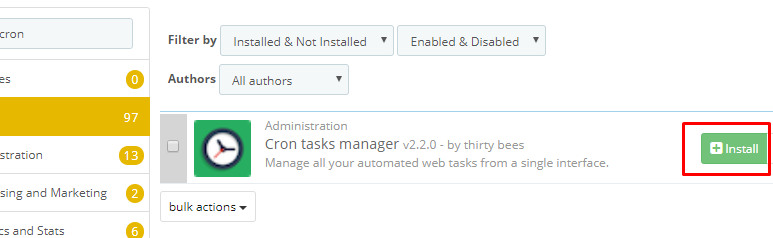
To start running your prestashop-thirtybees task scheduler, login to your back office dashboard. Go to Modules and Services. Search the word "cron". You should be able to see a screen similar to the image below.
task scheduler
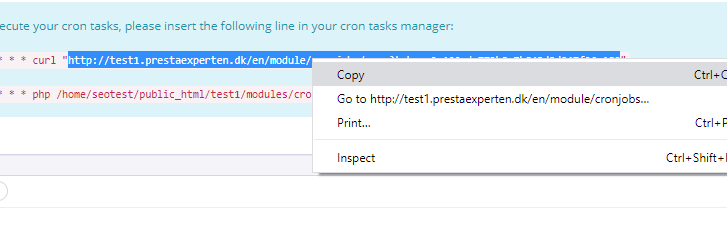
Click on the configuration and start scheduling your tasks. First off, copy the url like the one below. If you do not see the url, don't worry about it. We will get to it more, later.
cron jobs
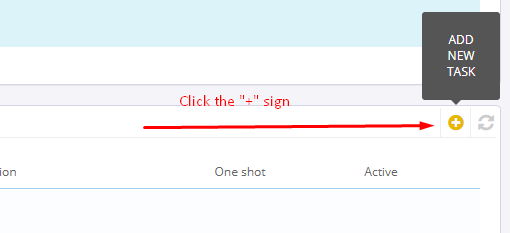
Click on the "+" icon to the right side of the page to create your first task.
cron jobs
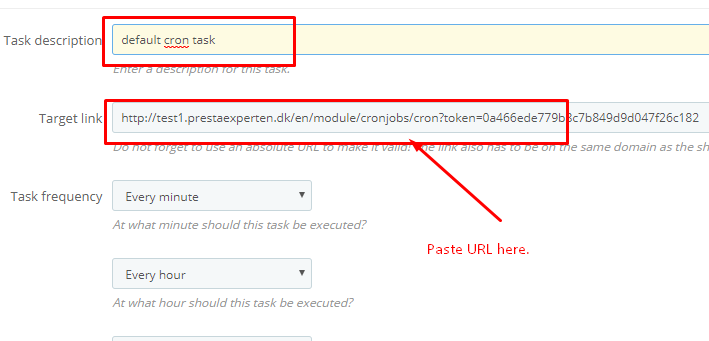
At the Add new task page, give your task a name or description to distinguish it from your other tasks, then paste the url link you copied in the previous page. Leave the other value untouched. This should give you more than enough functionalities for your first cron job task.
cron jobs
Click Save to save what you have done so far. Your task should appear at the bottom of the  page under "Cron Tasks", like so.

What are the elements to update when you run prestashop-thirtybees task scheduler?

There are four areas in your ecommerce store that you need to automate updates. The sitemap module (important), the product search (important), the Currency, and the Layered navigation module. Let's go through them one by one.

#1. Creating a task scheduler to automatically update the website sitemap.

The Sitemap module comes with a cron job functionality. But we want to manage our cron jobs on a single interface. So, what we will do is copy the urls to the Cron Job Manager modules. To do this and start running a cron job and automatically update and build your sitemap, go to Modules and Services, the search for sitemap. Click configure.
task scheduler
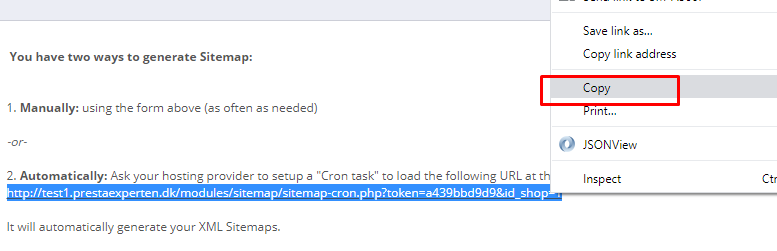
Scroll down to the bottom, and copy the url under the number 2 options "Automatically". Go back to the Cron Job manager configuration, and add another tasks.
task scheduler
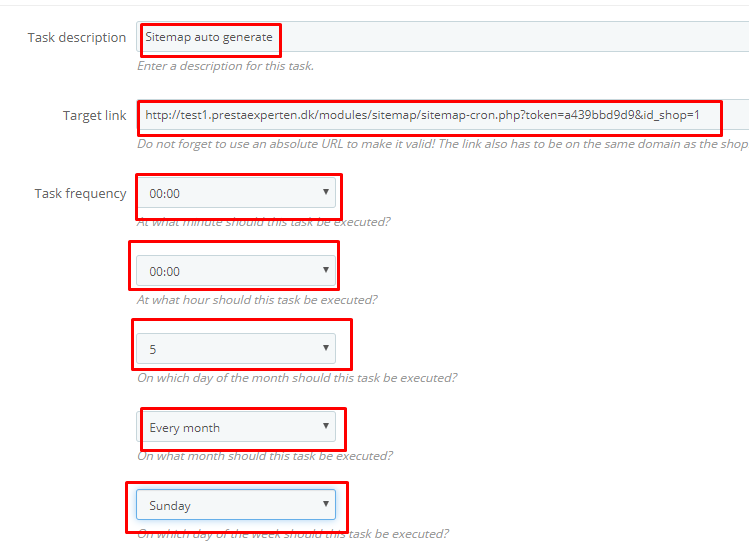
Give your task a description, i gave mine "Sitemap auto generate". Paste in the link copies from the sitemap module configure page. Give it the necessary task frequency as you like. Mine is set above, like so.
Save your work and refresh your frontpage to see if there are any errors on the page.

#2. To run cron job on Currencies, go to Localization >> Currencies.

Scroll down to the bottom of the page and you will see the link. Copy it then follow the same procedure we did when we created the task schedule for sitemap, like so.

#3. For the Product Search cron job. Go to Preferences, then Search.

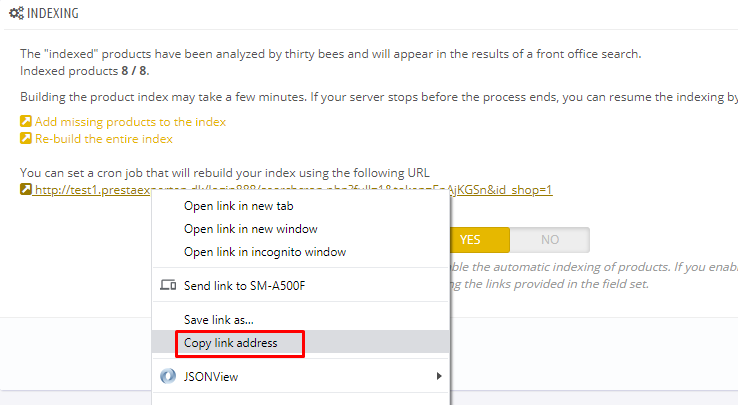
Look for "Indexing" tab. You should see a "You can set a cron job that will rebuild your index using the following URL" message. Copy the url, then go back to the Cron Job Manager, then create a new task schedule. Run the same process as you did with creating the sitemap task scheduler.
task scheduler
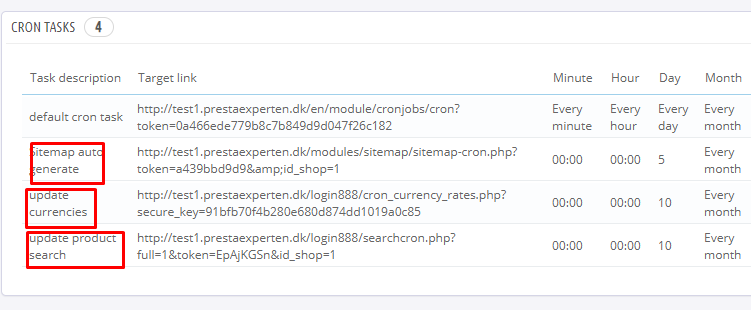
You Task Scheduler tab should look like the image below:
task scheduler

#4. The last item we need to run an automated task scheduler is the layered navigation module.

To implement a cron job on the layered navigation module is easy. It is similar to how we did on creating a task scheduler for sitemap. Go to the Modules and Services menu again, search the layered navigation module, then, click configure.
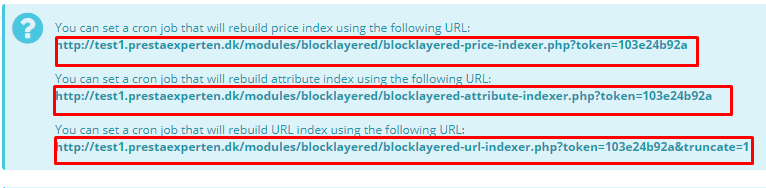
In the layered navigation module configure page, you will see three links that you need to insert to your Cron Job Manager. Copy them, like so.
task scheduler
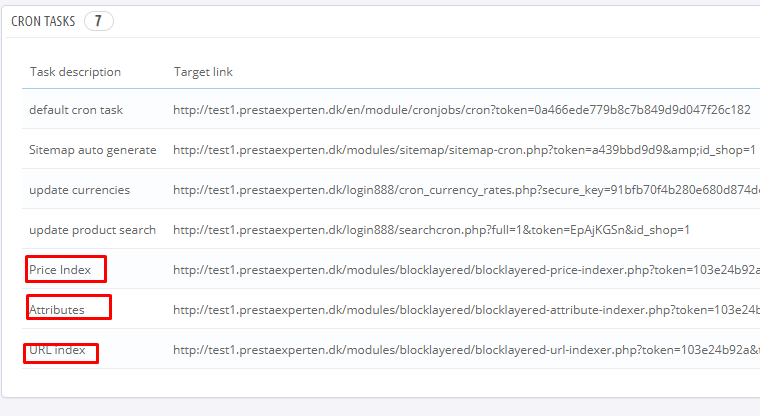
You will need to create a task for each of these url link. One for price index, one for attribute index, and another for URL index. Follow the same procedure we did when we created the task scheduler for sitemap. Once done, your Tasks Tab should look like the screenshot below, like so.
task scheduler
At this point, your task is done. Congratulations! You successfully setup your automated task scheduler for your webshop!

In conclusion

Setting an automatically scheduled task will not only be practical but will also prevent missing the supposed action to take on time.
Cron Job is a great way to manage such tasks either as a system administrator, shop manager/owner or any professions like a web developer. The good thing is that, running a cron job is not just for seasoned IT vets anymore. You can easily do it with the handy Cron Job Manager for prestashop-thirtybees. All you need to do is to use install it, and enter in the cron job urls in the right place.
Let us know if this tutorial is useful in the comment section. Don't forget to share to friends. Thanks!

Monday, November 4, 2019

How to Discover Product Defining Keywords For Your Ecommerce Website


Utilize your keywords wherever possible and as often as you need to! Insert your keywords into blog posts, social media posts and your website’s content. The more you use keywords within your content, the easier it will be for your target audience to find you.

How to Discover Product Defining Keywords For Your Ecommerce Website

Friday, November 1, 2019

3 Easy Ways to Find Your Website Target Audience

To find your website target audience is one of most important tasks you need to do as an ecommerce website lead digital marketer. It is the basis of all your online marketing strategy. It starts the moment you develop and name your products or services to the marketing channels you use to promote them.
Here’s a hint before we dig in:
Your target audience is not “EVERYONE.”
The primary reason you are defining your target group is to identify and understand your particular niche so you can dominate it.
It cannot be stressed enough that the better you understand your target market, the more closely you’ll be able to focus your ecommerce marketing strategy. This way, you only spend to reach the audience that will most likely to convert to customers. As you begin to go deeper into your audience insight, it is good to expect to see higher conversion rates and better return on your investments.

Let us define what is a Target Audience first before anything?

A target audience is a specific group of people with shared characteristics who are most likely to be interested in your products or services. Often, businesses use what they know about their target audience to create user personas. These personas guide their decisions on marketing campaigns.
Source.
It is worth noting that to find your website target group, look for their shared characteristics. They usually will share 2-3 of the following:
Gender
Age
Profession
Location
Income or education level
Marital status
For customers to feel connected to a product, service or brand, they need to relate to the content and tone of the company’s message.
You don't make your sales pitch for a sports item to elderly people group. You market it to young people and athletes! That is called speaking their language. Knowing which audience you’re targeting with each campaign will ensure that you speak their language. Understanding this important key allows you to zero in on them more easily.

So, Why is Having a Target Audience Important?

There are a bunch of reason why finding your website target audience is important. The more obvious reason is marketing focus. When you know your target audience, you get to focus your marketing effort. You can avoid unnecessary wasting of resources because you are able to reach the right people the right way. It enables you to identify the market well enough to hone your marketing effort to get better. As a result your money is spend better and wisely because you are able to craft target specific messages for your customers.

Read full article 3 Easy Ways to Find Your Website Target Audience
Find great resource on ecommerce website at shoptech media